

Did you know that a staggering 85% of organizations now use cloud-based test automation, underscoring the shift toward scalable and efficient testing environments. Meanwhile, 61% of all testing activities are now automated, accelerating development cycles by reducing testing time by nearly 30%.
Flutter continues to dominate the cross-platform development landscape. In this blog, we’ll explore how Flutter app automation testing works, its benefits, types of tests, best practices, and how real device platforms help streamline the process for faster, higher-quality releases.
What is Flutter?
Flutter refers to a Google-developed open-source UI toolkit that helps in building natively compiled web, desktop, and mobile applications from a single codebase. It offers a rich collection of pre-built widgets. It utilizes Dart as the programming language, enabling developers to create responsive and fast apps with a consistent look and feel across various platforms.
What is Flutter App Automation Testing?
Flutter app automation refers to the process of using tools and scripts to automatically test the UI, performance, and functionality of Flutter apps. Automated tests simulate user actions and validate outcomes across various platforms and devices, rather than relying solely on manual interaction with the application.
Importance of Flutter App Automation Testing
Automating Flutter app testing helps detect bugs early in the development cycle, maintain high app quality across devices, and accelerate release cycles. It also reduces the effort and time required for repetitive tests, which ensures consistency in behavior with updates and seamless integration into CI/CD. All in all, it’s crucial to scale QA in the current app development scenario.
Also Read: Best Tools for Automating Mobile App Testing
Types of Flutter Tests
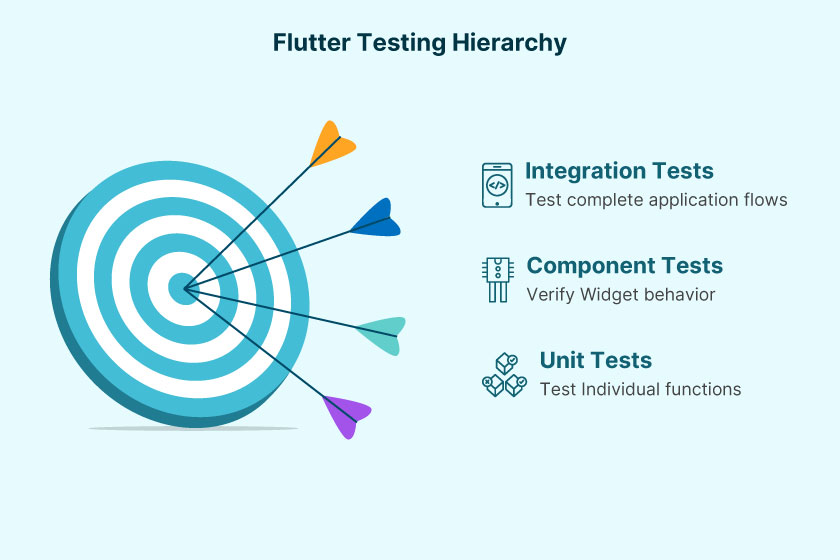
Flutter offers support for three core types of testing in a structured testing approach, where each of them serves a purpose. Understanding the types of Flutter tests helps in building a high-quality and reliable app by testing all aspects of the application, from complete user journeys to individual functions. Let’s take a look.
- Unit Tests
Unit tests emphasize testing of individual classes of functions in isolation. They are lightweight, fast, and facilitate ensuring that the application’s logic works as per expectations without having a complete dependency on the platform, services, or UI.
- Component Tests Or Widget Tests
This type of Flutter tests are used to verify the behavior in rendering one or more widgets. They’re responsible for simulating UI interactions without having to rely on a full app launch, which makes them relatively faster as compared to end-to-end or integration tests, although comparatively thorough than unit tests.
- Integration Or End-To-End Tests
Integration tests are responsible for testing large feature flows such as platform, API, and UI interactions, or the complete application. They run on both emulated and real devices and are crucial for identifying critical problems, testing, and analyzing user behavior.
How to Write Effective Test Cases for Flutter App Testing
Claim 180 free minutes on real Android and iOS devices.
Test on Devices
Writing crystal clear and maintainable test cases is crucial for the successful automation of a Flutter app. Well-structured test cases also enhance collaboration, minimize errors, and ensure the accuracy of test results across multiple test runs. Let’s check out some tips on how to write effective test cases for Flutter app testing.
- Clearly Defining The Test Objective
QA teams should ask themselves what exactly they are testing and begin with a crystal clear purpose. Whether it’s a data fetch operation, login form, or a button click, it’s crucial to define the goal in a single sentence.
- Allocate Meaningful Names
Allocate descriptive names to your tests so that they offer improved communication about what they do and enhance long-term readability.
- Proper Setup and Teardown
Always initialize test states or test data before testing and afterwards, you can keep cleaning them up as per requirement. Such an approach ensures the running of tests on a controlled and predictable environment.
- Validate Expected Results
Use assertions such as expect () to check whether the function or UI behaves according to expectations after performing an action.
How To Test Flutter Applications
Flutter app testing can utilize various testing methods, as each serves a unique purpose during development. Understanding when to use what and how is crucial in delivering a user-friendly and reliable Flutter application. Let’s take a look at how to test Flutter apps.

Manually Testing Flutter Applications
Manual Flutter application testing directly interacts with the Flutter app just like a real user would, which enables real-time feedback on the look and feel of the app. This method to test Flutter applications can turn out to be handy during the early developmental stages or while testing brand-new changes in the UI. Here are the parameters for manual testing checks.
- User Interaction
Testers can tap buttons, swipe screens, scroll lists, and perform other gestures to verify that the app responds correctly to user inputs.
- Device Orientation
By rotating the device or emulator, testers can check if the app layout adapts smoothly to different orientations, ensuring responsiveness.
- Visual Validation
Manual testing enables a thorough inspection of UI elements, colors, fonts, animations, and transitions to ensure that the visual design meets expectations.
- Exploratory Testing:
This approach helps identify unexpected behaviors or usability issues that automated scripts may not capture.
- Quick Feedback:
It provides immediate results without the need to write or run scripts, making it ideal for verifying small changes or fixes.
Flutter App Automation Testing
Claim 180 free minutes on real Android and iOS devices.
Test on Devices
Automated testing uses scripts and tools to execute predefined test cases, allowing you to validate the app’s functionality repeatedly and efficiently across multiple devices and environments.
- Scripted Tests
You can write test scripts using frameworks like Appium Flutter Driver, Flutter’s own integration test package, Espresso for Android, or XCTest for iOS.
- Cross-Platform Testing
Automated tests can run on various real devices or emulators simultaneously, saving time and increasing test coverage.
- Consistency
Automated tests eliminate human error and ensure that the same scenarios are tested exactly the same way every time.
- Comprehensive Coverage
Automated suites can cover a wide range of testing, including unit tests for individual functions, widget tests for UI components, and full end-to-end integration tests.
- Continuous Integration Support
Automated tests integrate seamlessly into CI/CD pipelines, enabling rapid feedback on code changes and helping maintain app stability.
Combining Flutter App Automation Testing With Manual Testing
Manual testing is essential for identifying UX or visual issues and conducting initial explorations. On the other hand, Flutter app automation testing is crucial for speed, reliability, and scalability. When QA teams implement a balanced testing strategy, they verify UX aspects and new features early on through manual testing, followed by preventing regressions and ensuring robustness as the application evolves through automated testing. All in all, by effectively leveraging both methods. Together, testers can deliver a well-performing Flutter app that also looks great and provides a seamless user experience across various platforms and devices.
Read More: How to test flutter apps? How is it different from testing native apps?
Flutter App Automation Using Appium Flutter Driver
Claim 180 free minutes on real Android and iOS devices.
Test on Devices
The Appium Flutter Driver is an extension of the Appium framework that enables test automation for Flutter apps on both Android and iOS platforms. It works by using WebSocket communication to relay WDIO test scripts to the Flutter driver, which sends commands to the app under test (AUT) and receives responses through the driver.
1.To set it up locally, clone the source code from GitHub, run npm install, then npm run build, and start the Appium server using node .. The package includes both the Appium Flutter Driver and Flutter Finder, along with a sample project that features WDIO test code for quick setup.
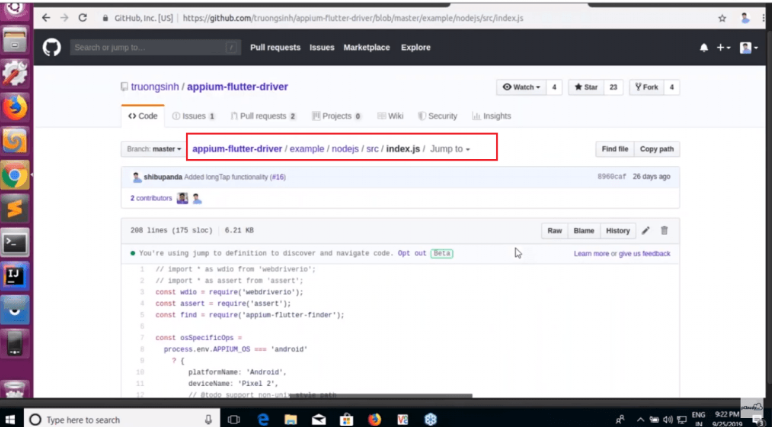
2. In the terminal, the automation name is set to “Flutter” for both Android and iOS, with port 4723. The capabilities include osSpecificOps, app path, device name, and platform name, all configured within a capabilities object.
3. Next, the context switches from Native to Flutter. After launching the app, we validate that CounterTextFinder shows zero using Flutter APIs, performing two actions: click and touch.
The button is clicked twice, and the strictEqual function verifies the result. Finally, the session is deleted.
4. Set the environment variable to connect to the target device.
5. Verify that the Appium server is running.
6. Run the test to see the actions performed on the device. The counter will increment to two.
More Details: Flutter App Automation Using Appium Flutter Driver
Real Device Cloud Flutter App Testing on Pcloudy
While local testing with emulators and simulators is helpful during development, they can’t replicate real-world usage conditions, such as varying screen sizes, OS versions, network behavior, and device hardware. Pcloudy offers a cloud-based testing platform with access to thousands of real Android and iOS devices, enabling you to test your Flutter app in environments that accurately reflect how users experience it.
1. Upload Your App
Export your Flutter app as an APK (for Android) or IPA (for iOS) file, then upload it to the Pcloudy dashboard.
2.Choose Real Devices
Select from 5000+ real devices based on OS version, manufacturer, model, and even location. This is crucial for ensuring consistent performance across the fragmented Android ecosystem and iOS versions.

3.Start Manual or Automated Testing
With manual testing, you can interact with your app in real time, such as tapping, swiping, rotating, and performing gestures just like on a physical device. For automated testing, write scripts using tools like Appium, Espresso, or XCTest and run them across multiple devices simultaneously.
4. Integrate with CI/CD Pipelines
Easily integrate Pcloudy with CI tools like Jenkins to automate app testing as part of your deployment workflow. This ensures bugs are caught before production.
5. Analyze Test Results
Access video recordings, device logs, and screenshots for each test session, identify performance issues like CPU or memory bottlenecks, and review detailed crash reports with full stack traces.
Flutter App Automation Testing Best Practices To Boost Efficiency and Quality
Claim 180 free minutes on real Android and iOS devices.
Test on Devices
Automated app testing plays a vital part in the entire Flutter development life cycle. Not only does it help in catching bugs early on, but it facilitates building consistency in app performance across different platforms and accelerates releases.
However, it’s noteworthy that automation can only be as effective as its strategies and implementation. Therefore, QA teams and developers should follow industry-standard best practices to maximize the benefits of Flutter app automation testing. Looking forward to enhancing both test quality and efficiency? Let’s dig into the most impactful best practices.
- Choose The Appropriate Testing Type
Enhance test coverage by understanding the purpose of each testing type. It also helps in avoiding any unnecessary complexities. Use unit tests for individual logic units, such as services or functions. Widget tests, on the other hand, are ideal for checking UI interactions and the behavior of single as well as grouped widgets. Integration tests should be reserved for testing interaction with real devices and end-to-end workflows. It’s crucial to balance different test script types, since overusing one might slow down your entire CI pipeline.
- Imbibe Clarity, Maintainability, and Test Code
Test scripts should be as understandable and clean as the application code. QA teams can accomplish this goal by using descriptive naming conventions for test functions and following the arrange-act-assert pattern to provide structure. As long as your tests are focused, isolated from one another, and short, they’ll be maintainable and easier to reuse, refactor, and debug.
- Mark External Dependencies
Database operations or real API calls can introduce flakiness and slow down your tests. Therefore, consider simulating responses by using mocking packages and creating predictable test conditions by stabbing user input and APIs. When it comes to unit or widget tests, try to avoid direct integration. Mocking helps in accelerating your test suite and increasing its reliability.
- Improve Integration Tests With POM
Enhance the structure of your test automation scripts by using Page Object Model or POM. Create separate classes for each UI component or screen and encapsulate test logic and locators inside these losses. Follow it up by reusing objects across different test flows increases the scalability of your test cases.
- Leverage The Power Of Real Device Cloud Platforms
If you’re looking forward to uncover platform, specific bugs and maintain consistency in the UX, testing on real devices is the best way to go platforms such as Pcloudy, facilitate the automation of cross platform and cross device testing at scale and offer collection of logs, screenshots, crash reports, etc. for debugging. Device clouds also offer a broader test coverage without burdening enterprises with the management of a full-fledged physical lab.
- Maintain Test Health By Analyzing Test Failures
Instead of overlooking a failing test, investigated thoroughly by regularly reviewing for outdated of leaky test cases. Also categorize, tag, and prioritize tests on the basis of their importance. Leverage reporting tools to track, pass or failure trends to execute tests. After all, healthy test suites are some of the most reliable app quality indicators.
Conclusion
Effective Flutter app automation testing goes beyond just writing scripts. The process comprises building a scalable, sustainable, and intelligent ecosystem for testing. QA teams should shift from reactive testing processes to proactive testing.
If you’re an enterprise looking to test Flutter apps on real devices in a streamlined manner, Pcloudy facilitates hassle-free Flutter integration, along with a broad array of real iOS and Android devices. QA teams also get access to comprehensive insights, including screenshots, logs, and performance reports. Take the 30-day free trial and experience and explore how you can redefine Flutter app automation testing on real devices.
FAQs
What languages are used to write Flutter test scripts?
Flutter tests are typically written in the Dart programming language. However, with tools like Appium, you can write tests in JavaScript, Java, or Python, depending on the framework you’re using.
Why is automated testing necessary for Flutter apps?
Automated testing is essential for Flutter apps because they run on multiple platforms from a single codebase. Automated testing ensures consistent functionality, improves development speed, reduces bugs, and boosts release confidence.
How are widget tests different from integration tests?
Widget Tests focus on individual UI components and their interactions. Integration Tests simulate real user workflows and test the app end-to-end, including API calls, navigation, and platform behaviors.
Claim 180 free minutes on real Android and iOS devices.
Test on Devices


 Nazneen Ahmed







