
Did you know that the API testing market size is projected to be worth approximately $12.4 billion by the year 2033 across the globe (Source: Global API Testing Market Size, Share, Statistics Analysis Report By Component)? The explosive growth makes it clear that APIs tend to be the backbone of today’s software. However, complexity can grow as APIs foster seamless communication among systems, which contributes to the emerging need for efficient API automated testing. In this blog, we’ll explore how combining the Cucumber BDD framework with RestAssured, integrated with a powerful cloud testing platform, can help in creating scalable, readable, and robust API test automation frameworks.
What is BDD?
BDD stands for Behavior Driven Development, which refers to a collaborative approach to software development. It empowers teams to define software behavior via examples in plain language. The emphasis here is to build a shared understanding of the working of features before QA teams move on to writing code.
BDD involves writing test scenarios using easy-to-read and natural phrases structured as steps featuring Given-When-Then. Feature files save these scenarios in the form of both automated test cases and documentation. BDD also facilitates the bridging of the communication gap between non-technical and technical stakeholders by increasing the accessibility and alignment of tests as far as user expectations are concerned.
Benefits of BDD
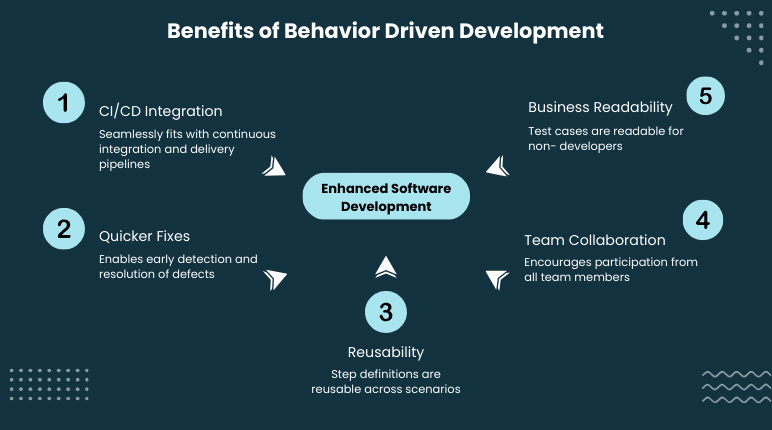
Behavior Driven Development or BDD is known to bring a certain level of clarity and structure into software testing. The biggest strength of BDD lies in fostering a shared understanding between non-technical stakeholders and technical teams with the help of real-world language used for describing system behavior. Let’s take a look at some benefits of BDD and some reasons why it has turned out to be the most preferred approach in modern DevOps and agile teams.
- Seamlessly Fits With CI/ CD and Agile
BDD thrives in iterative development models. You can run automated BDD tests as a part of your entire CI/CD pipeline, which offers QA teams reliable and accelerated feedback throughout the release cycle. It also offers support for continuous testing without negatively impacting delivery speed.
- Quicker Fixes With Fewer Defects
Teams are able to catch edge cases and logic gaps when they define expected behavior early and clearly before development even starts. In case problems arise, traceability and resolution becomes easier and quicker, thanks to readable scenarios.
- Higher Reusability and Maintainability Of Tests
The code behind every Gherkin step, aka, step definitions are reusable across various scenarios. Such a level of modularity increases the manageability of the entire test suite, decreases the chances of redundancy, and accelerates automation efforts over the long haul.
- Business-Friendly and Readable Test Cases
Since the Gherkin syntax is all about writing test scenarios in simple language with BDD, it increases test readability for non-developers. Business analysts and product managers are also able to review scenarios in detail without having the need to understand much code.
- Enhanced Team Collaboration
BDD encourages product owner, tester, and developer participation since everyone feels involved. In a way, they all contribute to test scenario definition using a common language. Such a cohesive alignment ensures that technical implementation ends up adhering business expectations from the beginning itself.
What is API Testing?
API testing refers to the process that verifies the working of Application Programming Interfaces or APIs as per expectations and intentions. We can think of APIs as invisible engines, allowing various software systems to trigger operations and exchange data. Instead of testing user interface, it focuses on the interaction between software components at service and data levels.
This process also includes checking that APIs are returning appropriate responses, enforcing security, handling edge cases, and meeting performance benchmarks. Testing APIs ensures the correct and reliable working of the core functionality across various platforms. Now that we understand what API testing is, let’s move on to why API test automation is the holy grail instead of solely relying on a manual approach.
Also Read: A Practical Guide to Automating End-to-End API Testing
Why Automate API Testing?
Whether we are dealing with two systems conducting an exchange of information or a mobile application using a server to retrieve data, APIs act as the backbone of apps to ensure flawless communication between various components. Given their critical nature, it’s crucial to ensure reliability via automated API testing. API automation testing is considered a more innovative and wiser approach in comparison with manual API testing for the following reasons.
- Better Efficiency and Speed
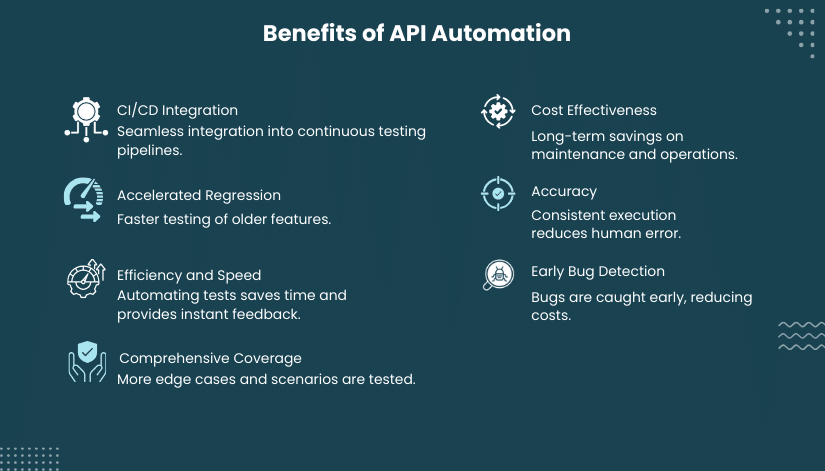
It can be extremely time-consuming to manually test APIs for each change in the code. API automation testing facilitates the running of thousands of tests within a few seconds. As a result, such an API test automation offers instant feedback during the processes of development, staging, and deployment.
- Higher and More Comprehensive Test Coverage
API automation testing allows testing of more edge cases, data combinations, and test scenarios that can turn out to be way too time-intensive to fully cover manually. That’s how API test automation boosts the overall stability and quality of a product.
- Early Detection Of Bugs
API test automation allows tests to run right after pushing a new code. This results in catching bugs early and often before they have a chance to seep into production, which further makes them easier to fix and cheaper.
- Better Accuracy
Repetitive software testing tasks always come with the risk of some level of human error. In API automation, testing ensures consistency in execution as well as results every single time which reduces the likelihood of overlooked problems and false positives.
- Long Term Cost Effectiveness
Even though the initial API test automation setup can take some time, it significantly reduces bug fixes, post release and intensive manual checks. Over time, API automation testing cuts down maintenance and operational costs.
- Accelerated Regression Testing
Every single time there’s a change in an API, testers need to ensure that older features are still working. API automation testing makes the process of regression testing repeatable and quicker which can turn out to be critical during rapid release cycles.
- Flawless CI/CD Integration
Testers can easily integrate automated API tests into CI/CD pipelines to facilitate continuous testing. Every single commit can automatically be verified which further helps QA teams make more confident and faster deployments.
What is a RestAssured Library?
RestAssured refers to a java-based library that automates restful API testing. It simplifies sending of API requests and checking the responses by offering a readable and straightforward syntax. That’s why it’s widely adopted by developers and testers due to its complexity-reducing qualities when it comes to writing as well as maintaining API tests.
It offers support for critical API testing functions such as handling authentication, headers, request parameters, checking returned data, and validating response status codes. It enables accelerated and reliable service verification, especially in DevOps and agile environments.
Also Check Out: Creating REST API Test in Pcloudy
Cucumber Framework Overview
Cucumber is one of the most popular automation testing frameworks that provides intensive support for Behavior Driven Development (BDD). It enables QA teams to provide straightforward descriptions of test scenarios in plain language, the structure of which any non-technical stakeholder could easily grasp. Feature files typically hold these scenarios written using Gherkin syntax.
Besides enhancing readability, Cucumber also bridges the gap between actual automation logic and natural language test cases, facilitating collaboration, traceability, and clarity. When QA teams pair it with tools such as RestAssured, they come up with a powerful and robust way of testing APIs in a structured format that all team members are easily able to trust and understand.
Integrating RestAssured Library with Cucumber Framework for RestAssured API Automation Testing
Combining RestAssured Library and Cucumber framework works great for writing automated API test scenarios. With the help of real test data, we’ll create a simple Maven project using:
- RestAssured to send API requests and validate responses.
- Cucumber to use plain English or BDD-style text to write test scenarios.
- TestNG to execute tests and for reporting.
Step 1: Set Up Your Maven Project
Start out by creating a Maven project followed by adding the required dependencies to the pom.xml file:
<!– Cucumber Dependencies –>
<dependency>
<groupId>info.cukes</groupId>
<artifactId>Cucumber-java</artifactId>
<version>1.2.5</version>
</dependency>
<dependency>
<groupId>info.cukes</groupId>
<artifactId>Cucumber-testng</artifactId>
<version>1.2.5</version>
</dependency>
<!– RestAssured Dependencies –>
<dependency>
<groupId>io.rest-assured</groupId>
<artifactId>rest-assured</artifactId>
<version>4.3.2</version>
</dependency>
<dependency>
<groupId>io.rest-assured</groupId>
<artifactId>json-path</artifactId>
<version>4.3.2</version>
</dependency>
<dependency>
<groupId>io.rest-assured</groupId>
<artifactId>json-schema-validator</artifactId>
<version>4.3.2</version>
</dependency>
<!– Hamcrest for assertions –>
<dependency>
<groupId>org.hamcrest</groupId>
<artifactId>hamcrest-all</artifactId>
<version>1.3</version>
</dependency>
Step 2: Organize The Project Structure
Use separate packages to keep the project modular:
- FeatureFile for .feature files in Cucumber scenarios
- stepDefinitions for Java code that runs the test steps
- testRunner for the Runner file that executes tests
Step 3: Write Feature File
Below is a Cucumber .feature file for testing the Reqres API:
File: Reqres_api_test.feature
Feature: Test Reqres user APIs
@SmokeTest
Scenario Outline: Reqres GET API test
Given the valid endpoint to fetch users
When the request is send to server with page number as “<page>”
Then validate the response of first user record having email as “<emailID>”
Examples:
| page | emailID |
| 2 | michael.lawson@reqres.in |
| 1 | george.bluth@reqres.in |
@SmokeTest
Scenario Outline: Reqres POST API test
Given the valid endpoint with payload to create user
When the request is send to the server
Then the new user must be created with name as “<username>”
Examples:
| username |
| john |
This file makes use of the scenario outline for running the same test using varying inputs with the examples table.
Step 4: Creating Step Definitions
This step involves writing Java classes matching and running steps from our feature file.
File: GetApiTest.java
package stepDefinitions;
import static io.restassured.RestAssured.given;
import io.restassured.RestAssured;
import io.restassured.http.ContentType;
import io.restassured.response.Response;
import org.testng.Assert;
import Cucumber.api.java.en.*;
public class GetApiTest {
Response response;
@Given(“^the valid endpoint to fetch users$”)
public void setupEndpoint() {
RestAssured.baseURI = “https://reqres.in/”;
RestAssured.basePath = “/api/users”;
}
@When(“^the request is send to server with page number as “([^”]*)”$”)
public void sendRequest(int pageNumber) {
response = given()
.queryParam(“page”, pageNumber)
.when()
.get()
.then()
.contentType(ContentType.JSON)
.extract().response();
}
@Then(“^validate the response of first user record having email as “([^”]*)”$”)
public void validateUserData(String emailID) {
String userEmail = response.path(“data[0].email”);
Assert.assertEquals(userEmail, emailID);
}
}
File: PostApiTest.java
package stepDefinitions;
import static io.restassured.RestAssured.given;
import io.restassured.RestAssured;
import io.restassured.http.ContentType;
import io.restassured.response.Response;
import org.testng.Assert;
import Cucumber.api.java.en.*;
import java.util.HashMap;
public class PostApiTest {
Response response;
HashMap<Object, Object> map = new HashMap<>();
@Given(“^the valid endpoint with payload to create user$”)
public void setupEndpointAndPostData() {
RestAssured.baseURI = “https://reqres.in/”;
RestAssured.basePath = “/api/users”;
map.put(“name”, “john”);
map.put(“job”, “Software Developer”);
}
@When(“^the request is send to the server$”)
public void sendRequest() {
response = given()
.contentType(ContentType.JSON)
.body(map)
.when()
.post()
.then()
.statusCode(201)
.extract().response();
}
@Then(“^the new user must be created with name as “([^”]*)”$”)
public void validateResponse(String name) {
String userName = response.path(“name”);
Assert.assertEquals(userName, name);
}
}
We’re using annotations such as @When, @Given, and @Then to link each method to a step within the feature file.
Step 5: Creating the Test Runner
File: Runner.java
package testRunner;
import org.testng.annotations.*;
import Cucumber.api.CucumberOptions;
import Cucumber.api.testng.*;
@CucumberOptions(
features = “src/test/java/FeatureFile”,
glue = {“stepDefinitions”},
tags = {“@SmokeTest”},
plugin = {
“pretty”,
“html:target/Cucumber-reports/Cucumber-pretty”,
“json:target/Cucumber-reports/CucumberTestReport.json”
}
)
public class Runner {
private TestNGCucumberRunner testNGCucumberRunner;
@BeforeClass
public void setUp() {
testNGCucumberRunner = new TestNGCucumberRunner(Runner.class);
}
@Test(dataProvider = “features”)
public void my_test(CucumberFeatureWrapper CucumberFeature) {
testNGCucumberRunner.runCucumber(CucumberFeature.getCucumberFeature());
}
@DataProvider
public Object[][] features() {
return testNGCucumberRunner.provideFeatures();
}
@AfterClass
public void tearDown() {
testNGCucumberRunner.finish();
}
}
This runner performs the integration of Cucumber and TestNG and runs all tagged scenarios.
Step 6: Configuring TestNG XML
File: testng.xml
<?xml version=”1.0″ encoding=”UTF-8″?>
<!DOCTYPE suite SYSTEM “http://testng.org/testng-1.0.dtd”>
<suite name=”TestNG-Cucumber Suite” thread-count=”10″ parallel=”tests”>
<test name=”API Test Execution”>
<classes>
<class name=”testRunner.Runner” />
</classes>
</test>
</suite>
This configuration facilitates TestNG to run API tests as well as generate comprehensive reports.
Also Check Out: Automate your tests on Android and iOS, the codeless way
API Test Automation Best Practices
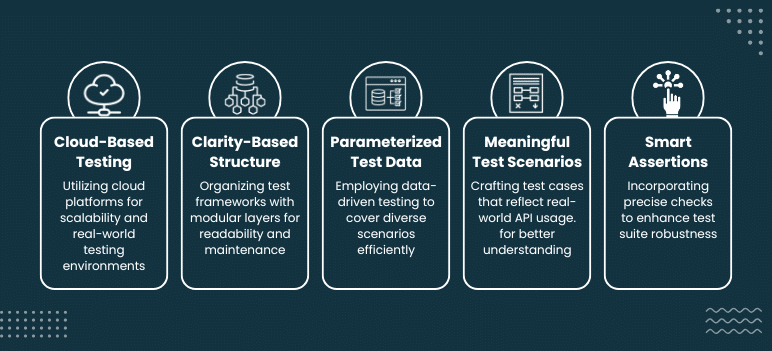
Robust API test automation isn’t just about writing a bunch of test scripts. The process of API automation testing calls for a highly structured approach to ensure scalability, maintainability, reliability over time. Here are some of the proven API test automation-based practices to follow while using a combination of tools such as Cucumber, RestAssured, and Pcloudy.
- Run Test On a Credible Cloud-Based Platform
It’s a good idea to run all your API tests in a trustworthy, credible, and reliable cloud-powered test lab such as Pcloudy (check out Pcloudy case studies) for better collaboration, scalability, and real device environment access. It will ensure the testing of your API across and different configurations and make them production ready.
- Follow Clarity-Based Test Structure
Use standard layers such as utility classes, step definitions, and feature files for organizing test framework. Such a modular structure enhances readability and simplifies maintenance.
- Parameterizing Test Data
Use data driven testing for covering various test cases with different sets of inputs unlike hard-coding values, to improve test coverage and reduce the likelihood of duplication.
- Using Meaningful Test Scenarios
Write test cases reflecting real-world API usage by using clear Gherkin syntax in your feature files. This practice will increase the understandability of scenarios for both non-technical as well as technical team members.
- Smart Incorporation Of Assertions
The higher the precision of your checks using meaningful assertions, the more robust the test suites will be, whether it’s for verifying a data format, a particular field value, or response time.
Conclusion
API test automation using the Cucumber BDD framework and RestAssured Library can efficiently validate back-end services while maintaining the collaborativeness and readability of tests. Of course, API test automation is just one part of the puzzle. Some other equally essential parameters include real device, compatibility, speed, and scalability in the current-day testing environments, which is where Pcloudy comes into the picture. If you’re an organization, looking forward to enhancing your API testing strategy with the best team collaboration tools, test analytics, real device testing environments, and seamless integration into CI/CD pipelines, Pcloudy is the way to go. Use Pcloudy’s Cloud testing platform and check exactly how it ensures higher quality APIs, fewer bugs, and faster releases, simultaneously maintaining efficiency and alignment with your teams.
FAQs
What is the primary purpose of API automation testing?
The primary goal of API test automation is to ensure that the backend services of an app display expected behavior despite the UI being uninvolved. It checks error handling, security, performance, and data accuracy.
How do BDD and Cucumber improve collaboration?
Cucumber enables teams to write test cases using Gherkin, a shared language, so that business stakeholders, testers, and developers can together participate in defining system behavior.
What makes Cucumber a good fit for API testing?
Cucumber adds clarity by allowing test cases to be described in natural language, while still connecting them to powerful Java-based API testing logic via RestAssured.