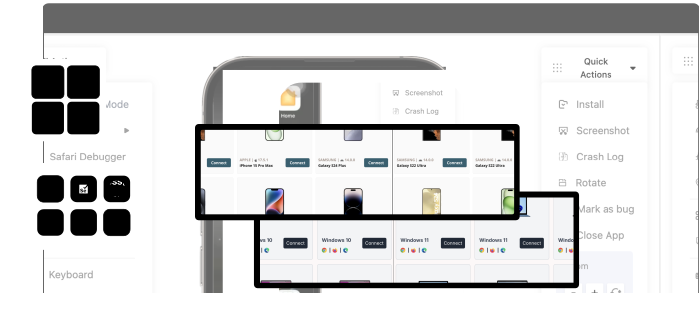

Did you know that in 2026, the number of iOS users are expected to rise to a whopping 1.38 billion? Traditionally, iOS testing and development have always required a Mac, which can often turn out to be a barrier for Linux and Windows users. More and more QA teams are looking forward to testing apps on Windows, which has led to an increasing demand for dependable PC-based solutions.
Even though complete emulation for iOS on PC still has limitations because of Apple’s relatively closed ecosystem, nowadays, there’s no shortage of iOS emulators for PC options, cloud-based platforms, and simulators to facilitate running iOS applications on PC for demos, basic testing, and development. In this guide, we’ll explore the best 10 iOS emulators for PCs and some other relevant information complementing the list.
TL;TR
Difference Between iOS Emulator vs Simulator
An emulator replicates both iOS hardware and software, approximating memory and CPU Behavior even though complete hardware accuracy isn’t practically possible on systems that aren’t Apple. On the other hand, a simulator just mimics the software layer, which makes it appropriate for basic functional and UI testing, though inadequate for sensor, battery, and performance validation.
Since Apple doesn’t offer a license for iOS on non-Apple hardware, true iOS emulation has major restrictions as it depends on cloud access to devices, partial emulators, and simulators.
Test on real devices. Ship with confidence.
Also Check Out: iOS App Debugging Made Easy
Limitations of iOS Emulators on PC
iOS emulators for PCs come with a lot of convenience. However, there are several limitations that negatively impact their testing accuracy. After grasping these gaps, QA and development can set realistic expectations for the workloads. Let’s take a look.
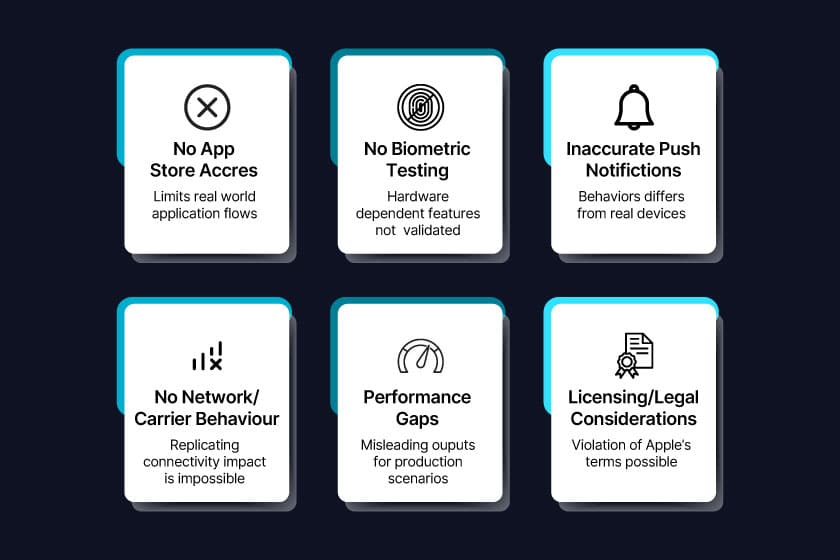
- No Access To The App Store
A majority of PC based emulators aren’t able to connect to the app store, which limits the testing, updates, and installation of real-world application flows.
- No Access To Biometric Testing
Features such as Touch ID, Face ID, and authentication that depend on hardware don’t accurately get validated when it comes to an emulator.
- No Accuracy For Push Notifications
The behavior of simulated notifications is often vastly different from that of real devices, making it challenging to test delivery, timing, and application responsiveness.
- No Network/Carrier Behavior
It’s next to impossible to completely replicate carrier-specific behaviors, SIM-based features, and network conditions that have an impact on testing for applications that depend on connectivity.
- Performance Gaps
Emulators are unable to 100% replicate real battery, memory, GPU, and CPU performance. Therefore, testing on a PC can generate misleading outputs for various production scenarios.
- Licensing or Legal Considerations
Sometimes, when testers run iOS outside of Apple hardware, it could lead to a violation of Apple’s terms. As a result, it limits enterprise deployment or commercial usage.
Also Check Out: Real Device Cloud vs Emulator for Mobile App Testing – What Should You Use?
How to Choose an iOS Emulator for PC
Depending on budget, required features, and organizational goals, QA teams can choose the appropriate iOS simulator for PC. Let’s check out some parameters that help in making the right choice.
- Budget Constraints
While free emulators can turn out to be good for demos, small tests, or learning, if you’re planning on accessing a broader device range with highly accurate testing results, it’s wise to go for cloud-based or paid solutions.
- Required Features
Check for support across different debugging tools, automation frameworks, device resolutions, and iOS versions to ensure that your iOS emulator for PC is able to simulate the most app-relevant scenarios.
- Purpose
If showcasing application demos, quick functional checks, or early development is the purpose, emulators could be the appropriate choice. However, real devices are still a necessity for hardware, performance, and production level validation.
- Sufficiency Of Emulators Versus Real Devices
Use simulators and emulators for user interface checks, demos, and early development and real iOS devices for accurate validation of compliance, hardware features, performance testing, and production QA.
Also Check Out: Best iOS Testing Tools for QA Engineers in 2026
Top 10 iOS Emulators for PCs in 2026
Due to Apple’s multiple restrictions on various non-Apple hardware, it can be challenging to find a reliable iOS emulator for PC, considering the fact that most current-day solutions are either robust browser-based simulators, Mac-hosted simulators, or cloud device access platforms. But it’s still possible to run iOS apps on PC in 2026 for QA workflows and development. On that note, let’s check out the top 10 iOS emulators for PCs in 2026.
1. Appetize.io – Leading Browser‑Based iOS Simulator
Overview:
Appetize.io is a popular browser-based iOS simulator for PC that allows uploading and running of iOS applications without local installation directly in a web tab. Since it’s cloud-hosted, it’s possible to share links with various teammates, use it across macOS, Linux, or Windows and integrate with CI/CD without the need for a Mac. The platform excels for mobile presentations, lightweight testing, and quick demonstrations.
Key features:
- iOS simulation- is web-based and accessible from a wide range of browsers
- Application upload as well as sharing through URL.
- Seamless integration with CI/CD pipelines.
Pros:
- Offers support for automation workflows.
- Easy to share demos with stakeholders.
- Since it runs completely in the browser, the installation is not required.
Cons:
- Unsuitable for performance testing
- Limitations in hardware feature simulation.
Best for:
Best for early developer previews, demos, and lightweight testing.
Pricing:
Available at your free tier with paid plans based on usage
Test on real devices. Ship with confidence.
2. Corellium – Ideal for Security Research
Overview:
Corellium offers ARM-based virtualization that brings close to real iOS simulation for PC to researchers and security teams. It lets teams prototype operating system-level changes, analyze low-level system behavior, and test out security exploits for advanced vulnerability assessment and QA workflows.
Key features:
- Real device fidelity and ARM virtualization
- State rollback and snapshot support
- Reverse engineering tools with deep debugging
Pros:
- Strong rollback and snapshot capabilities
- Highly configurable variety of virtual devices
Cons:
- Steep learning curve
- Doesn’t go much further beyond general development
Best for:
Advanced iOS research and security testing
Pricing:
Enterprise licensing needed
3. BrowserStack – Great for Cross‑Browser iOS Testing
Overview:
BrowserStack offers cloud access to visual devices, including iPads and iPhones to run iOS apps on PC. Testers are able to interact remotely with live iOS devices and facilitate the capturing of screenshots and behavior validation under various device conditions.
Key features:
- Extensive and regularly updated device library
- Cloud-based access
- Automated Appium testing support
Pros :
- No need to maintain any physical device labs
- Real hardware to minimize emulator limitations
Cons:
- Performance is entirely dependent on network quality
Best for:
Cross device and cross browser testing teams that need real iOS hardware
Pricing:
Mostly paid plans with options for concurrent sessions
4. Testmu AI – Good for Parallel iOS Testing
Overview:
LambdaTest (now TestMu AI) is an AI-powered cloud device testing platform that enables QA teams to test iOS apps on Windows. By providing access to simulators and real devices, QA teams are able to run multiple testing cycles at the same time on a wide array of OS versions.
Key features:
- Parallel test execution
- Simulator and real iOS device access
- Automated test integration, such as Appium and Selenium
pros:
- Accelerated regression testing with parallel runs
- Offers support for both automated and manual tests
Cons:
- Can get extremely expensive if testing at scale
- Dependency on the cloud limits offline testing
Best for:
Teams that require fast CI/CD test cycles
Pricing:
Subscription with plenty of concurrency options
5. Smartface – Ideal for Cross‑Platform Development
Overview:
Smartface is one of the leading full-stack app development and testing platforms that offers an iOS emulator for PC via cloud access. With an interface tailored to simplify debugging, the platform offers developers the option to debug, build, and test out cross-platform applications from a Windows machine without having to switch to MacOS.
Key features:
- Advanced debugging tools
- Cloud emulator and real device access
- Cross-platform application testing
Pros:
- Appropriate for hybrid app development
- Built-in cloud-based device access
Cons:
- Not that optimal from a pure native iOS testing point of view
- Steep learning curve, especially for new users
Best for:
Cross-platform teams focused on building iOS and Android together
Pricing:
Paid plans with testing units
6. iPadian – Ideal for Basic iOS Experience
Overview:
Emulator for Windows targeted to recreate the classic iPad UI look and feel on a PC. While it’s not a complete iOS emulator, the platform can turn out to be useful for learning iOS behavior and for basic interface previews. It is an affordable way to get some experience of the iOS style UI without having to invest in actual Apple hardware.
Key features:
- Close to the iPad UI environment on Windows
- Light and straightforward installation
- Pre-loaded simulations
Pros:
- Low system requirements
- More affordable than most other options out there
Cons:
- Unable to install the actual app store applications
- Unsuitable for real app testing
Best for:
Casual iOS interface simulation and UI previews
Pricing:
One-time purchase with current pricing available on the official website
7. Sauce Labs – Enterprise-Grade iOS Testing Platform
Sauce Labs is a cloud-based testing platform that enables QA teams to run iOS applications on real devices and simulators directly from a PC. With a strong focus on enterprise-grade scalability, it allows teams to execute both manual and automated tests across a wide range of iPhones and iPads without maintaining physical infrastructure.
The platform integrates seamlessly with CI/CD pipelines, making it suitable for teams aiming for continuous testing and faster release cycles.
Key features:
- Access to real iOS devices and simulators in the cloud
- Support for automated testing frameworks like Appium and Selenium
- Parallel test execution for faster regression cycles
- CI/CD integrations with tools like Jenkins, GitHub Actions, and Azure DevOps
- Detailed test logs, video recordings, and debugging insights
Pros:
- Scalable infrastructure for enterprise testing needs
- Supports both manual and automated testing workflows
- Reduces dependency on maintaining physical device labs
Cons:
- Pricing can be high for small or mid-sized teams
- Performance depends on network stability
Best for:
Enterprise QA teams looking for scalable, cloud-based iOS testing with automation and CI/CD integration
Pricing:
Subscription-based pricing with plans based on concurrency and usage
8. Apple Xcode Simulator on a Cloud Mac – Great for Native Development
Overview:
Users can remotely access Apple’s official iOS simulators through cloud-based Mac services even though Xode simulator natively runs only on Mac OS. Testers still have a true native environment for running iOS apps on PC through a cloud Mac which preserves Apple’s debugging features and official tooling.
Key features:
- Closest to real Apple development as an official Apple iOS simulator without having to own a Mac
- Complete integration with Xcode tools
- Real building and debugging experience
Pros:
- Ideal for native iOS development
- Accurate debugging and simulation
- Official Apple environment.
Cons:
- Needs cloud Mac subscription
- Not a standalone emulator for PC
Best for:
Developers who need Apple’s official simulator but are working from Windows
Pricing:
Subscription or cloud Mac rental
9. Electric Mobile Studio – Ideal for Windows Developers
Test on real devices. Ship with confidence.
Overview:
Electric Mobile Studio provides a Windows-centric iPhone emulator with great debugging, support and developer tools. It offers highly integratable inspection tools with visual studio, live reload, and multiple device profiles. Even though it doesn’t run Apple store apps, electric mobile studio is a solid choice for early functional testing and responsive user interface checks.
Key features:
- Seamless integration with visual studio
- Developer oriented debugging tools
- A variety of device profiles
Pros:
- Accelerated UI previews
- Decent tooling for Windows devs
Cons:
- Limited support for hardware features
- No real iOS application installation
Best for:
Windows developers performing early functional testing
Pricing:
Paid license, also a free trial
10. Remoted iOS Simulator – Good for Visual Studio Users
Remoted iOS simulator helps developers focused on iOS from Windows by mirroring iOS screen and facilitating interaction as teams would on real devices with actual execution on a cloud or a paired Mac.
Key features:
- Rotation, touch, and gesture support
- Works with Xamarin and visual studio
Pros:
- Simple Visual Studio integration
- Provides real UI interaction
Cons:
- Needs cloud Mac or Mac backend.
- Not a standalone emulator
Best, for:
Visual studio developers targeting to build iOS apps
Pricing:
Free with visual studio as long as there’s a Mac connection
| S. No. | Tool | Type | Biometrics | App Store | Free tier | Appropriate for |
|---|---|---|---|---|---|---|
| 1. | Appetize.io | Cloud simulator | ✕ | ✕ | Yes, limited | Browser-based demonstrations |
| 2. | Corellium | Virtual device | Limited | ✕ | ✕ | Security research |
| 3. | BrowserStack | Cloud-based | ✕ | ✕ | Free trial | Cross browser quality assurance |
| 4. | LambdaTest | Cloud-based | ✕ | ✕ | ✔ | Parallel testing |
| 5. | Smartface | Simulator | ✕ | ✕ | ✔ | Cross-platform dev |
| 6. | iPadian | Simulator | ✕ | ✕ | Paid | Basic testing |
| 7. | AIR iPhone | Simulator | ✕ | ✕ | ✔ | Lightweight testing |
| 8. | Xcode (Cloud Mac) | Simulator | ✕ | ✕ | Paid | Native development |
| 9. | Electric Mobile | Simulator | ✕ | ✕ | Free trial | Windows devs |
| 10. | Remoted iOS | Simulator | ✕ | ✕ | ✔ | VS users |
Why Real Device Testing Beats iOS Emulators
IOS emulators are a decent option for early development and speed, but they will never be able to completely replicate every single real-world condition. This makes physical devices critical to ensure reliable app performance for real users, meeting compliance and production requirements, and for capturing hardware-specific behavior. Let’s take a detailed look at why real device testing beats iOS emulators.
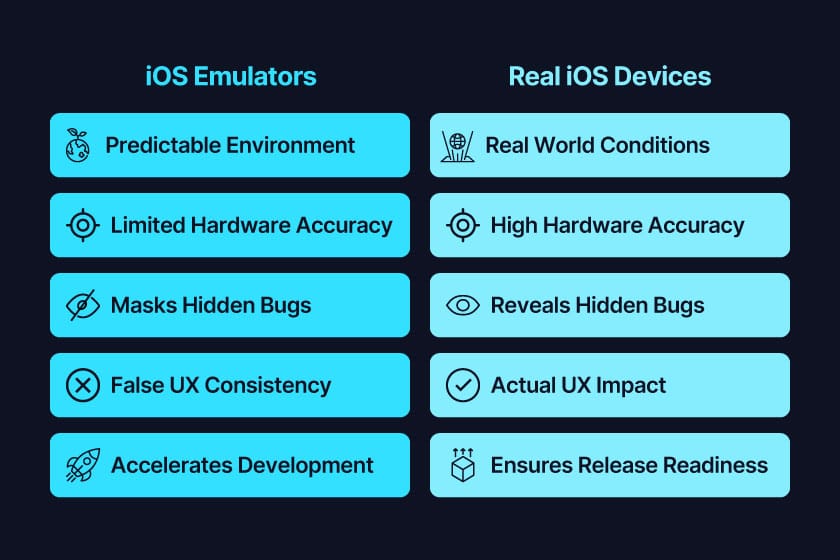
- Validation Versus Simulation
Simulators work by replicating the operating system to make them useful for functional and UI testing. But they aren’t able to mirror real hardware behavior, unlike real devices that validate app performance in production, thereby bridging the development and deployment gap.
- Better Hardware Level Accuracy
Emulators aren’t completely able to reproduce hardware-level factors such as sensor interactions, GPS accuracy, camera performance, biometrics, battery usage, GPU rendering, CPU throttling, etc. that have a direct impact on stability and performance. Only physical devices are able to expose issues related to these.
- Revelation Of Hidden Bugs
iOS emulators usually run in super-predictable environments that can mask lags, crashes, and performance bottlenecks, only making an appearance on real devices. Since users operate on limited storage, fluctuating battery, and networks, and multiple apps running in the background, it’s important to use real devices.
- Impact of OS and Device Differences on UX
OS versions and device models are responsible for handling animations, memory, and background processes within the Apple ecosystem. While with an emulator, only testing is just enough to create a false sense of some level of consistency, it’s the real devices where uncovering of model specific problems that have an actual impact on UX happens.
- Better Production Confidence
While emulators accelerate development, it’s real device testing that brings forth release readiness. It’s essential for reliability and quality-focused teams to validate on physical hardware.
Why Pcloudy Is the Right Choice
While emulators are somewhat limited to validation at a code level, Pcloudy solves this problem and others, such as complete testing of battery behavior, OEM-specific features, biometric features, and network conditions by offering 100% cloud-based AI-powered real device testing, which, in turn, enables scalable, production ready, and highly accurate validation for iOS apps.
- Perfect For Enterprise-Grade Mobile App Testing
QA teams can access a broad range of real devices along with flexible public, private, or on-premise deployment. Accelerated QA cycles with parallel execution is also great for regulated industries where emulators tend to fall short.
- Real Devices With Zero Virtual Shortcuts
By using real hardware, Pcloudy captures memory, GPU, and CPU performance along with NFC, Bluetooth, camera, functional biometrics, thermal behavior, and sensor interactions.
- AI-Based Test Acceleration
Artificial intelligence facilitate optimization of test execution detecting bottlenecks, highlighting critical parts, and recognizing recurring failures. QA teams can get actionable insights to enhance reliability and pre-release quality of the application.
- CI/CD Integration With In-Depth Automation
Pcloudy seamlessly integrates with GitHub actions, Jenkins, Azure DevOps, and Appium to carry out automated parallel testing across various real devices. Screenshots, videos, and logs further accelerate debugging and increase reliability.
- Better Production Confidence With Faster and High Quality Releases
Real Device testing with Pcloudy helps in uncovering OEM-specific behaviors and crashes, performance issues, and network problems that emulators tend to often miss. This platform also ensures better production readiness of apps with improved app store ratings and user retention, along with reduced to negligible post-release defects.
Also Check Out: Using the iOS Tunnel on the pCloudy Desktop Assistant
Conclusion
While emulators can’t completely replicate network conditions, hardware behavior, or real-world performance, they do tend to be useful for quick testing, demonstrations, and early development processes.
However, organizations completely on board with moving beyond the challenges and limitations of emulators are free to leverage Pcloudy’s AI-powered, cloud-based real device platform for reliable, precise, and scalable testing across various iOS and Android devices. Sign up for the 30-day free trial and see for yourself!
FAQs
Is it possible to run iOS apps on a Windows PC?
Yes, you can run iOS apps on a Windows PC through iOS emulators for PC. Although emulators are going to have some limitations compared to real devices.
Is there a free iOS emulator for PC?
Some of the most popular options for free iOS emulators include iPadian and Appetize.io, but they aren’t capable of fully replicating real-world performance or hardware.
What is the most accurate method for testing iOS apps without a Mac?
One of the most accurate ways of testing iOS apps without a Mac includes cloud platforms such as Pcloudy that offer real iPads and iPhones as the most reliable option.
Why aren’t iOS emulators able to test Face ID?
Face ID depends on secure hardware components that emulators aren’t able to replicate. Therefore, real devices are a must for highly accurate testing of features such as Face ID.