
Last updated on : 11 Feb 2026
Release Note 8.1
Overview
Pcloudy 8.1 is focused on one thing: helping teams move faster without losing confidence in quality. This release introduces AI powered test case generation to eliminate manual test design, smarter UI performance insights to catch slow experiences early, and a revamped automation report that makes build health and trends instantly clear.
Together, these updates reduce rework, surface issues sooner, and give teams the clarity they need to ship reliably at speed.
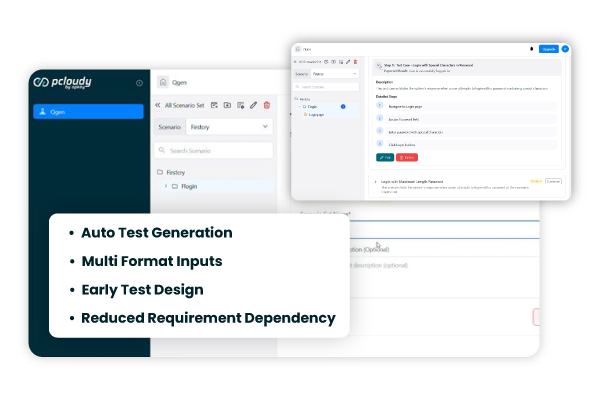
New Feature: Qgen AI Powered Test Case Generation
Creating test cases is often time consuming and dependent on how clearly requirements are written. Qgen removes this bottleneck by using AI to generate structured, high quality test cases directly from functional inputs.
Teams can provide descriptions, images, documents, APIs, or URLs, and Qgen automatically analyzes them to produce comprehensive test cases that improve coverage and accelerate test design.
Key Highlights
- Generate test cases automatically from multiple input formats
- Improve test coverage with consistent structure and depth
- Reduce manual effort during test design
- Speed up early stage testing and requirement validation
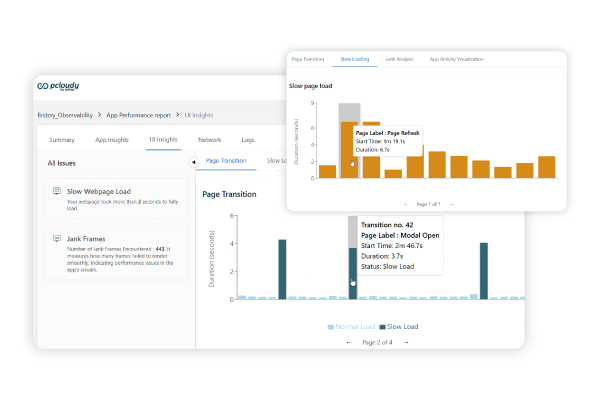
Performance Experience Testing Enhancement: UI Insights Slow Loading Detection
Performance issues often hide until users experience them in production. The Slow Loading feature in UI Insights helps teams proactively identify screens and transactions that take longer than expected to load. By automatically flagging slow UI behavior based on defined thresholds and linking it to execution evidence, teams can quickly diagnose and resolve responsiveness issues.
Key Highlights
- Automatically detect slow loading screens and user flows
- Identify performance bottlenecks using real execution data
- Improve application responsiveness and user experience
- Reduce investigation time for performance related issues
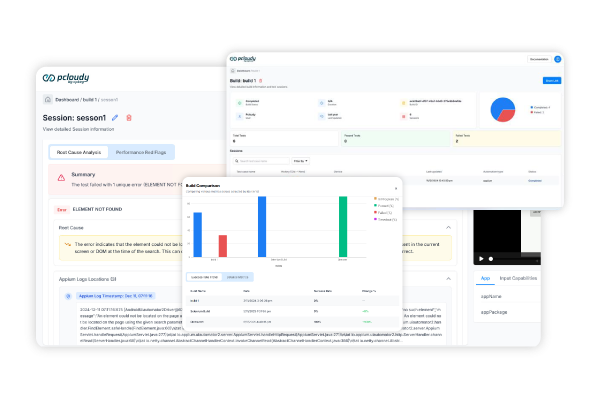
Product Enhancement: Automation Report Revamp
Understanding automation results at scale often requires manual analysis and context switching across builds. The revamped Automation Report brings clarity with visual success indicators, trend tracking, and AI driven diagnostics across Selenium and Appium executions. Teams can now compare builds, identify unstable patterns, and understand failures faster with less effort.
Key Highlights
- Visual success rates to quickly identify unstable builds
- Build comparison and trend analysis across executions
- AI driven root cause insights with reduced noise
- Clear separation of Selenium and Appium results
Did this page help you?